Video Tape Emulator 2
Your audio, rewound to the video era.
Hiss, wobble, warmth and that squashed, slightly worn sound of a well-loved VHS. From a clean late-model deck to a chewed-up rental copy, Video Tape Emulator 2 gives anything the instant nostalgia of video tape.
Windows 64-bit VST3 only. No Mac version yet.
Not sure yet? Try the free demo.
Hear it
The news report and the ident play the clean audio first, then the same audio through Video Tape Emulator 2. The two Skitchy tracks are finished pieces made using it.
News report
Clean first, then through Video Tape Emulator 2
Video Tape Emulator 2 Before & after
Every VCR had a voice of its own
Stretched tape, heads slightly out of line, sticky reels, cheap electronics and an over-eager limiter. It was considered rough at the time, and now it is the sound of an era. Video Tape Emulator 2 lets you choose exactly how much of it you want.

Lo-fi & beats
Warm, wobbly and hissy: the texture that makes a loop feel lived-in.
Synthwave & vaporwave
Put the real 80s back into your 80s-inspired tracks.
Film, TV & games
Found footage, flashbacks, home videos and in-game TVs that sound the part.
Sound design & sampling
Age a sample, a voice line or a whole mix in one move.
Every flaw, on a knob
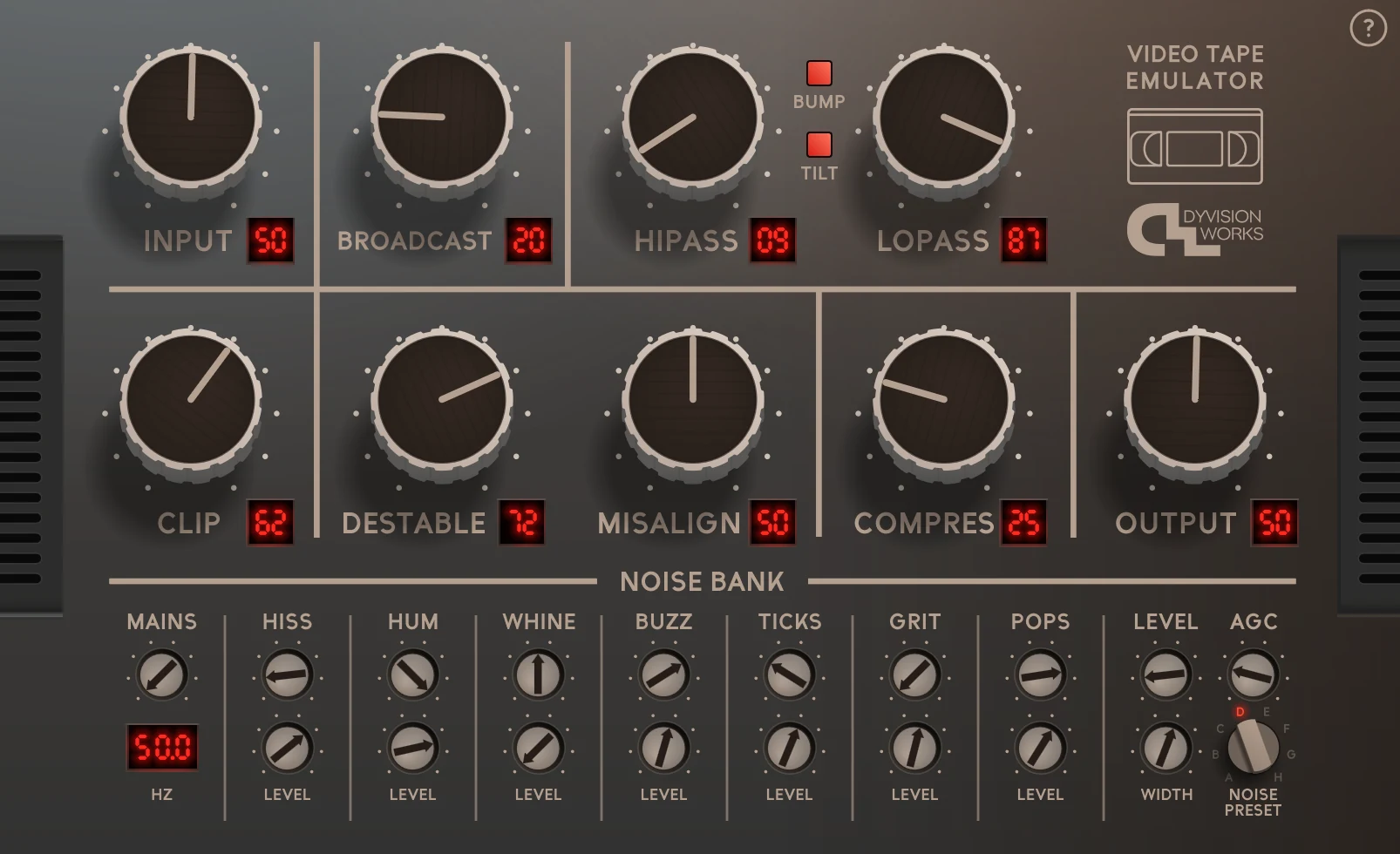
No menus: every part of the sound has its own control, from the tape itself to every kind of noise on it. Go as subtle or as wrecked as the track needs.
The level going into the tape. Push it and everything after it bites harder.
The dense, loud, squashed sound of TV audio taped off the air.
Thin out the bottom end and roll off the top, for that soft, many-times-copied sound.
A lift in the midrange, in three strengths: green, orange and red.
A subtle tilt to the tone, as on a real deck.
The crunch of tape running out of headroom.
Wow and flutter: the drifting, seasick wobble of a stretched tape.
The muffled, wandering top end of heads that are slightly out of line.
The pumping squash of a VCR's built-in level control: glue for a mix, or a squeeze for one sound.
The level coming out, from silent to +12 dB.
Every kind of noise, on its own controls
Hiss, hum, whine, buzz, ticks, grit and pops, each with its own character and level, and eight tapes' worth of presets to start from.
Eight tapes, A to H. Pick one and every noise control is set for you.
Change the character of each kind of noise, from one tape's to another's.
Mix each kind of noise in or out, from a trace to the full amount.
How often the pops and crackles come.
50 to 60 Hz: the hum and buzz of a European or an American deck.
All of the noise at once, from a whisper to a wall.
Automatic gain control for the noise, as on a real VCR.
From mono noise, as off a mono deck, to stereo.
More features
- Freely resizable. Drag the window bigger or smaller and every knob and readout stays crisp, from a laptop to a 4K monitor.
- A whole noise bank. Start from one of eight tapes' noise, then shape every kind of noise on its own.
- Works at the sample rate you work at. 44.1, 48 or 96 kHz.
- Every knob can be automated. Let the tape wear in through a song, or snap back for a chorus.
- Built-in help. Click the ? on the panel and every control explains itself.
Try the real thing. Free.
The demo is the complete plugin: every knob, every sound, in your own sessions on your own tracks. Take your time, and buy when you're sure.
The demo goes silent for one second every 30 seconds, and the panel says DEMO VERSION. Buy the full version and both disappear.
Buy it once.
Use it everywhere.
No dongle, no serial number, no online activation. Install it on your studio machine and your laptop and get on with your work. I’d rather spend my time making plugins than making you jump through hoops.
DyVision Works is one person: me. I make every plugin myself, and if you email, the person who made it writes back.
- 00Dongles to plug in
- 00Serial numbers or online activations
- 01Instant download, and you're recording
DyVision plugins are made by one person and used by one of the world's largest video game companies, recording and film studios, radio stations, and producers who just want their audio to sound right.
What you get
- Format
- VST3, 64-bit
- System
- Windows 10 and 11 only. No Mac version yet.
- Channels
- Mono and stereo
- Sample rates
- 44.1 to 96 kHz
- Controls
- 11 main controls, a 19-control noise bank, 8 noise presets
- Interface
- Freely resizable, sharp on 4K screens
- Delivery
- Instant download
- Copy protection
- None
Press play on the past
Windows 64-bit VST3 only. No Mac version yet.